
Renewal Attribution Window
Important: This setting is NOT available for Apphud & Iaptic receipt verification users.
The Renewal Attribution Window defines how long an affiliate continues to receive commission on renewals or recurring payments related to a specific transaction.
Instead of affiliates earning commission indefinitely on all subscription renewals, you can now set time limits to control costs and create flexible partnership arrangements. For example, if you set a 30-day timeout, affiliates only earn commission on renewals that occur within 30 days of the original purchase.
This setting does not extend attribution to all future purchases by the same user — it applies only to the original purchase event and its subsequent renewals.
Overview
When a user makes an initial purchase that is successfully attributed to an affiliate (within the Click Attribution Window), that affiliate may also receive a share of revenue from future renewals of that same subscription or transaction.
The Renewal Attribution Window specifies how long this renewal-based revenue sharing remains active. You can configure this at two levels:
- Company-wide defaults that apply to all affiliates automatically
- Per-affiliate custom settings that override the company default for special arrangements
Once the configured window expires, any further renewals will no longer generate affiliate commission, giving you precise control over long-term commission costs.
When the window starts counting
The window is measured from the point the affiliate won the customer, not from the age of the customer's receipt.
This matters because the app stores keep one receipt chain for a subscription even when the customer stops paying and comes back later. On iOS, a lapsed subscriber who resubscribes to the same subscription group continues the original receipt, so the purchase arrives as a renewal of a subscription that may have started years ago. If the window were measured from that original purchase, a returning customer could never be inside it.
A new window therefore starts whenever:
- the customer makes an initial purchase
- the customer redeems an offer code or promotional offer (an action they had to take, so it counts as a new conversion)
- the customer resubscribes after their subscription lapsed, meaning there was a real gap in their access
Renewals of an unbroken subscription do not restart the window. A renewal that arrives late because of a billing retry or a billing grace period is still part of the same subscription and does not restart it either.
Excluding your own offer codes
If you run offer codes that aren't tied to any affiliate — a trade show giveaway, a free month for a support case, or any other code you hand out directly — redeeming one of these should not start a new window or reset an affiliate's renewal count, since no affiliate brought in that redemption.
Add the code's reference name (from App Store Connect or RevenueCat, not the individual code a customer types in) to Excluded Offer Codes under Company Settings → Payments. What happens next depends on whether the customer was still subscribed when they redeemed it.
Redeemed while still subscribed. The redemption is treated as an ordinary renewal of the customer's existing subscription. The affiliate who originally won the customer keeps their existing window and renewal count exactly as if the code redemption hadn't happened, because they still won that customer and the subscription never stopped.
Redeemed after the subscription lapsed. The previous affiliate's attribution is closed out, and the redemption opens an attribution of its own that earns nobody anything. Neither the redemption nor any renewal that follows it pays commission, until the customer does something that starts a genuine new conversion, such as redeeming an affiliate's own code.
That second case matters when an affiliate has renewals left on their conversion that were never used. Without closing the old attribution, a customer who lapsed and then came back through your own campaign would spend that unused renewal on revenue the affiliate had no part in.
The reference name must match exactly, including spaces, punctuation and capitalisation. App Store Connect shortens long reference names in its own lists, so copy the full name from the offer's detail page rather than from a list view, or the code will not be recognised as excluded.
Win-back campaigns
Because a redemption starts a new window, you can run win-back campaigns with creators using a short window. A customer who lapses and then redeems a creator's offer code starts a fresh attribution, so the creator is paid for bringing them back, even though the customer's original purchase is long outside the window.
Click Attribution vs Renewal Attribution
| Setting | Applies To | Description |
|---|---|---|
| Click Attribution Window | First purchase | Time allowed between affiliate link click and initial purchase. |
| Renewal Attribution Window | Renewals of that purchase | Time period after the initial sale during which renewals of that same transaction continue to reward the affiliate. |
Dashboard Configuration
The Renewal Attribution Window feature provides a two-level configuration system that gives you complete control over commission timeouts while maintaining operational simplicity.
1. Company-Wide Default Settings
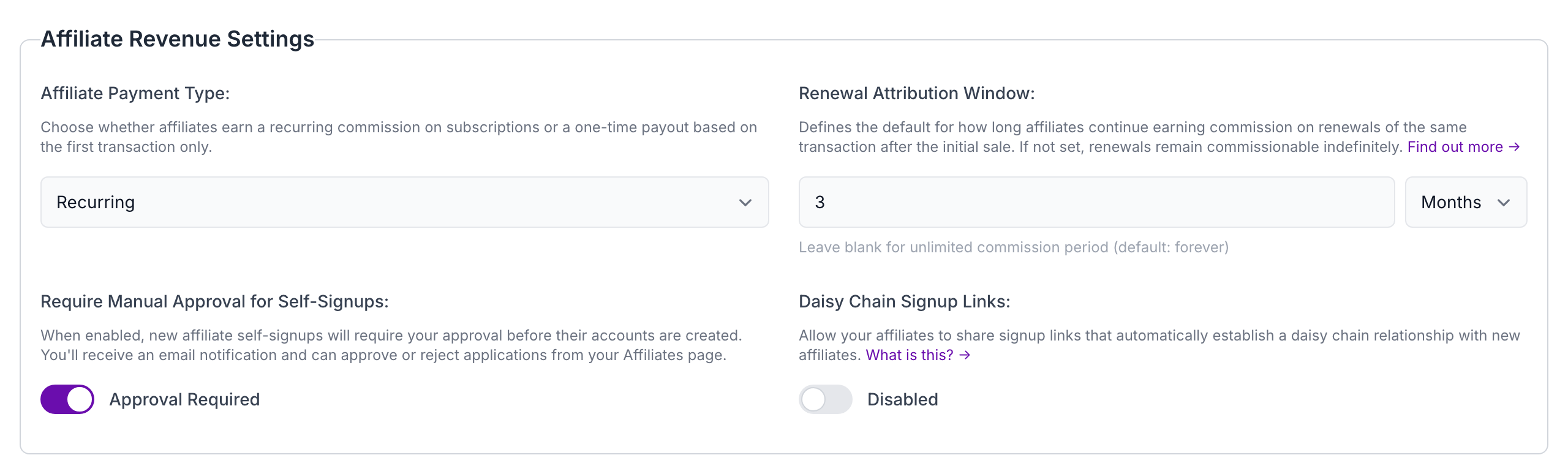
Location: Company Settings → Renewal Attribution Timeout
- Purpose: Sets the default timeout for ALL affiliates in your company
- Use Case: Establish a baseline policy (e.g., "All affiliates earn commission for 60 days after initial sale")
- Fallback: This setting is used when an affiliate doesn't have a custom timeout set
Click to view full size
2. Per-Affiliate Custom Settings
Location: Affiliates → Individual Affiliate Details → Renewal Attribution Settings
- Purpose: Override the company default for specific affiliates
- Use Case: Special arrangements for VIP affiliates or different partnership tiers
- Priority: Always takes precedence over company-wide settings
How It Works
- Set Company Default: Configure your company-wide default timeout (e.g., 30 days)
- Automatic Application: Most affiliates will automatically use this default limit
- Custom Overrides: For special affiliates, set custom timeouts (e.g., 90 days for top performers, 7 days for trial affiliates)
- Automated Processing: The system automatically applies the appropriate timeout when processing subscription renewals
Important: Leaving the renewal attribution window empty or clearing the value means affiliates will receive commission on renewals indefinitely — there is no time limit on renewal commissions.
Example Configuration
| Affiliate Type | Setting | Commission Window |
|---|---|---|
| Company Default | 30 days | Standard policy for all new affiliates |
| Affiliate A | Uses default | 30 days (inherits company setting) |
| Affiliate B (VIP) | Custom override | 90 days (extended for top performer) |
| Affiliate C (Trial) | Custom override | 7 days (shortened for trial period) |
| Affiliate D (Premium) | Empty/cleared value | Indefinite (no time limit on renewals) |
Benefits
- Cost Control: Prevent indefinite commission payments on long-running subscriptions
- Flexible Partnerships: Reward top affiliates with longer commission windows
- Simple Management: Set once at company level, customize only when needed
- Operational Efficiency: Automated application based on configuration hierarchy
Limiting by count instead: Commissionable Renewals Per Conversion
The window limits commission by time. If what you actually want is to pay a creator a fixed number of times per customer, use Commissionable Renewals Per Conversion instead, which limits by count.
Set it to 1 and a creator is paid once per customer they bring in, however long that customer stays subscribed. Leave it empty and every renewal earns commission, which is the default.
Why you might prefer counting
A common creator arrangement is "one commission per customer you bring us". Expressing that as a time window is awkward: you have to guess a duration that lines up with your billing period, and the answer changes if you sell monthly and annual plans side by side.
Counting renewals expresses the arrangement directly. One paid renewal is one paid renewal, whether your subscription renews monthly or yearly.
It is also the natural fit when your creator offer is a free first period. The signup itself is worth nothing, so what you want to pay on is the first renewal where the customer actually pays, which lands two periods after signup rather than one.
What counts towards the limit
Only paid renewals count.
- A free trial does not count
- A free promotional month from an offer code does not count
- The conversion at the end of a trial does count, because that is the first time the customer pays
So a creator offering a free first month is paid on the first month the customer actually pays for, not on the free one.
When the count resets
The count is kept per conversion, not per customer for all time. It resets on exactly the same events that start a new window, described in When the window starts counting: a new initial purchase, an offer code redemption, or a resubscription after a lapse.
So a creator who wins back a lapsed customer a year later earns their commission again for that new conversion.
Configuration
Both levels work the same way as the window:
- Company default: Company Settings → Commissionable Renewals Per Conversion
- Per-affiliate override: Affiliates → Individual Affiliate Details → Commissionable Renewals Per Conversion
| Affiliate Type | Setting | Result |
|---|---|---|
| Company Default | 1 | Every affiliate is paid on the first paid renewal per customer |
| Affiliate A | Uses default | Paid once per customer converted |
| Affiliate B (VIP) | Custom override of 6 | Paid on the first six paid renewals per customer |
| Affiliate C | Empty/cleared value | Paid on every renewal, with no limit |
Using both together
The two settings work together, and a renewal has to satisfy both to earn commission.
| Goal | Configuration |
|---|---|
| Pay once per customer converted | Commissionable renewals = 1, window empty |
| Pay for the first year of each subscription | Commissionable renewals empty, window = 1 year |
| Pay for up to 3 renewals, but only within the first year | Commissionable renewals = 3, window = 1 year |
Changing either setting later
Both limits are applied when you look at the transactions, not frozen when they arrive. If you raise the limit from 1 to 3, or widen the window, renewals that were previously excluded become payable straight away, including ones recorded months ago. Lowering either works the same way in reverse. Nothing is recalculated or lost in between.
Renewals over the limit are still recorded against the affiliate, so the subscription history stays complete. They are shown as earning no commission and are not included in the affiliate's payable balance.