
Short Codes
Short codes provide a streamlined way for influencers and affiliates to promote your products, making them particularly effective for platforms like TikTok where links are less practical.
What Are Short Codes?
Short codes are 3 to 25 character identifiers, made up of letters and numbers only, that directly associate purchases with an affiliate. They are designed to be simple, memorable, and easy to share verbally or visually. This makes them highly effective for viral marketing campaigns, especially on video-heavy platforms such as TikTok and Instagram.
Unlike traditional deep links, short codes allow affiliates to promote offers without requiring their audience to click a link, increasing engagement in scenarios where clickable links aren’t feasible (e.g., in TikTok videos or live streams).
Privacy-First Attribution
Short code attribution is private by design. A user typing an affiliate's code into your app is a clear, deliberate action, so none of the machinery link-based attribution usually depends on is needed:
- No fingerprinting or probabilistic matching: a purchase is attributed only when the affiliate's code is passed with it. Attribution either happened or it didn't.
- No cookies or cross-app tracking: nothing follows users around the web, so ad blockers and strict browser privacy settings can't break attribution.
- Minimal data: attributing a purchase requires only the affiliate's short code and your company ID, sent as metadata on the purchase by your integration. No sensitive user data is involved.
- No mobile attribution platform (MMP) required: code redemption is deterministic, so complex attribution tooling is unnecessary.
This makes Short Code Only mode a strong fit for apps that market themselves on privacy: affiliates still get shareable links and click analytics (see Shareable Short Code Links below), while end users are never tracked across sites or apps.
Shareable Short Code Links
If your deep linking platform is set to Short Code Only, you can optionally give each affiliate a shareable link alongside their short code. This is useful for placements where a link is practical — link-in-bio pages, YouTube descriptions, newsletters — while your attribution continues to run entirely on short codes.
Each affiliate's link follows this format:
https://insertaffiliate.link/{yourCompanyId}/{affiliateShortCode}
If you've configured a custom domain and enabled it for new links, your domain is used instead — for example https://links.yourcompany.com/{yourCompanyId}/{affiliateShortCode}.
What Followers See
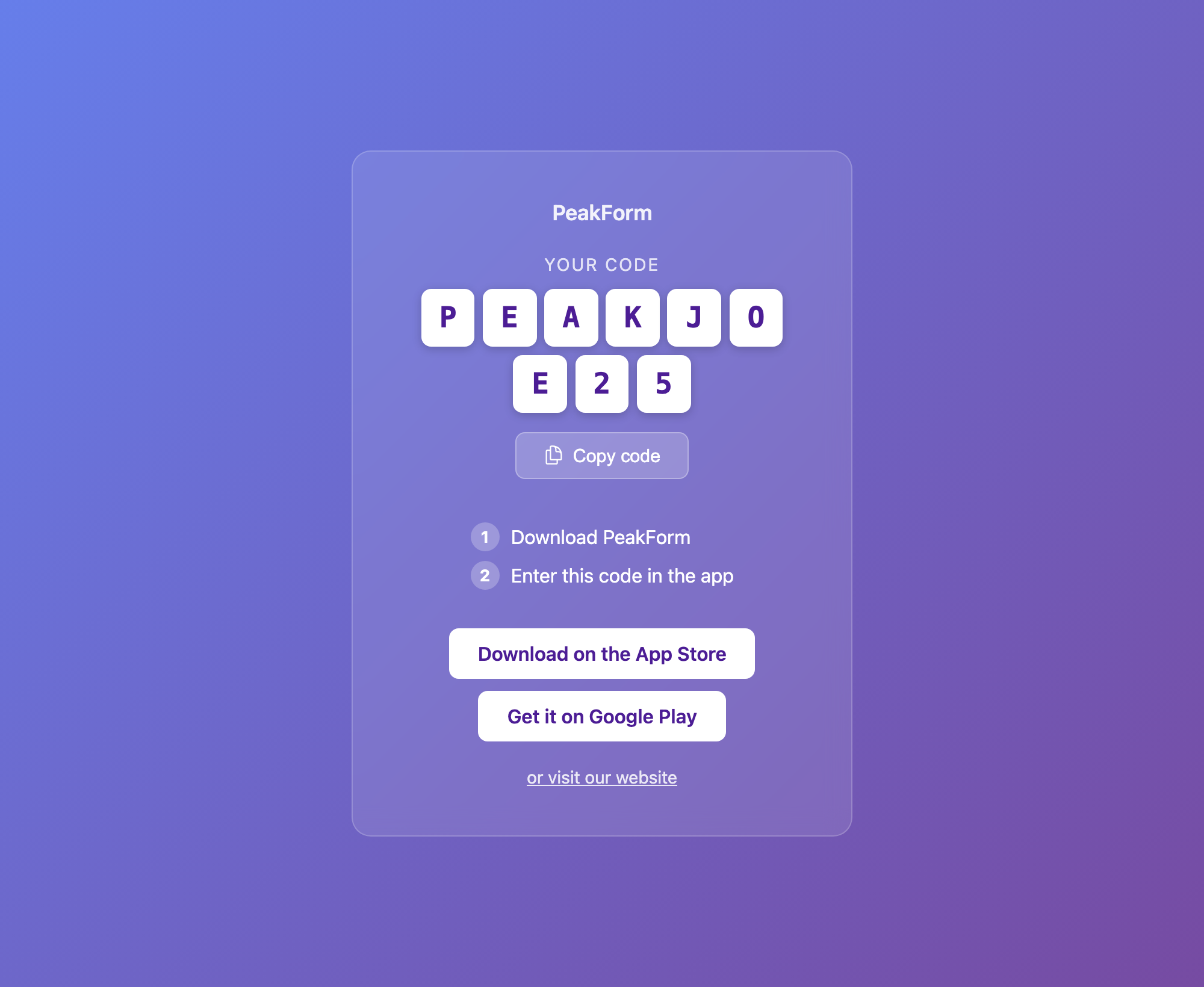
Opening the link shows a landing page that displays the affiliate's short code in large, easy-to-read code tiles, along with:
- A Copy code button so followers can copy the code in one tap
- Instructions to enter the code in your app
- Download buttons for your app, if you've added your iOS App Store Link and/or Google Play Store Link in Settings (Business & Profile tab)
Click to view full size
Note: The landing page displays the short code — it does not apply it automatically. As with any short code, the user enters it in your app and your integration passes it (together with your company ID) as metadata on the purchase for attribution. Your existing short code integration works unchanged.
Click Analytics
Opens of short code links are recorded in the same way as other deep link clicks, so they feed into your existing click analytics and install event payments.
How to Enable Short Code Links
Short code links are opt-in and disabled by default, so nothing changes for your programme until you switch them on:
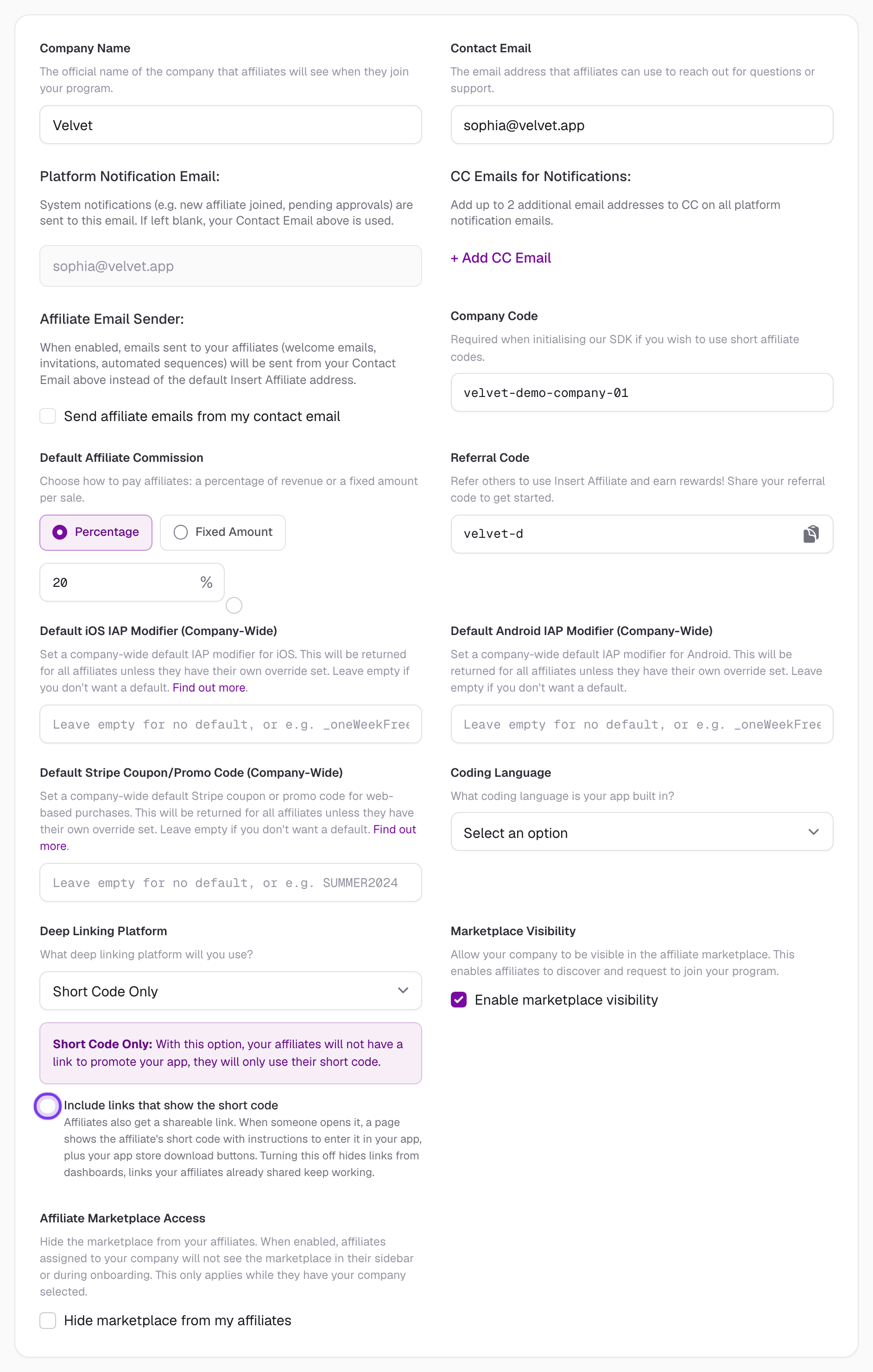
- Go to your Settings page (General tab)
- Under the Deep Linking Platform section, select Short Code Only
- Tick the checkbox Include links that show the short code
- Save your settings
Click to view full size
Once enabled, each affiliate's link appears:
- On the affiliate's dashboard, next to their short code
- In your admin Affiliates list
Tip: If you haven't added an iOS App Store Link or Google Play Store Link in Settings (Business & Profile tab), the landing page can't show download buttons — you'll see a warning in Settings until at least one store link is added.
What Happens If You Disable Short Code Links
If you later untick the checkbox:
- Links are no longer shown on affiliate dashboards or your admin affiliates list
- Newly created short codes won't get working links
- Links your affiliates already shared keep resolving, so anything they've published (bios, video descriptions, posts) doesn't break
Short Code Visibility
You can choose whether short codes are visible to your affiliates or hidden entirely. This is useful if your programme relies solely on deep links and you want to give affiliates a simpler, links-only experience.
How to Toggle Short Code Visibility
- Go to your Settings page (General tab)
- Find the Short Codes dropdown
- Select Short Codes Enabled or Short Codes Disabled
- Save your settings
What Happens When Short Codes Are Disabled
When you disable short codes:
- Affiliates will only see their deep link in their dashboard, settings page, and onboarding flow
- Short code metrics are hidden from both your admin views and affiliate views
- The onboarding experience is simplified — new affiliates see instructions focused solely on their deep link
- Short code performance cards are removed from the admin dashboard
This setting applies across your entire programme and takes effect immediately.
When to Use Links-Only Mode
Disabling short codes works best when:
- Your app uses a deep linking platform such as Insert Links, Branch.io, or AppsFlyer
- You want to simplify the experience for non-technical affiliates
- Your tracking and attribution is handled entirely through deep links
Note: If your deep linking platform is set to Short Code Only, short codes will always remain visible regardless of this setting, as they are your primary tracking method.
Setting Short Codes for Affiliates
Affiliate short codes are set during affiliate account creation and cannot be modified afterward. This ensures consistency and prevents confusion in tracking affiliate performance.
When creating a new affiliate, you'll be prompted to set their short code. Choose carefully, as this will be permanent.
If you wish to provide an affiliate with a new short code, please delete this affiliate via your Affiliates section, and create their account again.
Short Code Requirements
- Must be between 3 and 25 characters long.
- Must contain only letters and numbers (alphanumeric characters).
- Must be unique within your company. Codes are not case sensitive, so
jack10andJACK10are the same code.
New short codes are saved in uppercase.
Required Code
IOS Setup
For Swift Short Code integration, follow the instructions on our GitHub repository.
Android Setup
For Android Short Code integration, follow the instructions on our GitHub repository.
React Native Setup
For React Native Short Code integration, follow the instructions on our GitHub repository.
Flutter Setup
For Flutter Short Code integration, follow the instructions on our GitHub repository.
Javascript / Capacitor Setup
For Javascript Short Code integration, follow the instructions on our GitHub repository.
Unity Setup
For Unity Short Code integration, follow the instructions on our GitHub repository.