
Paying Affiliates
We support two ways to process affiliate payments:
On-Platform Payments (Stripe Connect)
- Process payments directly through our platform
- Affiliates receive payments directly to their Stripe account
- Stripe Fees: Approximately 2.9% + $0.30 per transaction (view current rates)
External Payment Tracking
- Track commissions for payments you process outside our platform
- Manually mark commissions as paid
- Perfect for existing payment workflows and keeping costs low
Choose the method that best fits your business needs. You can even use both methods simultaneously for different affiliates.
Payment Methods
External Payments
You can track and mark payments as paid externally for affiliates. This is useful when:
- You prefer to handle payments outside the platform
- The affiliate hasn't connected their Stripe account
- Your company hasn't connected their Stripe account
Stripe Connect Payments
For payments processed through Stripe, both the company and affiliate need to connect their Stripe accounts:
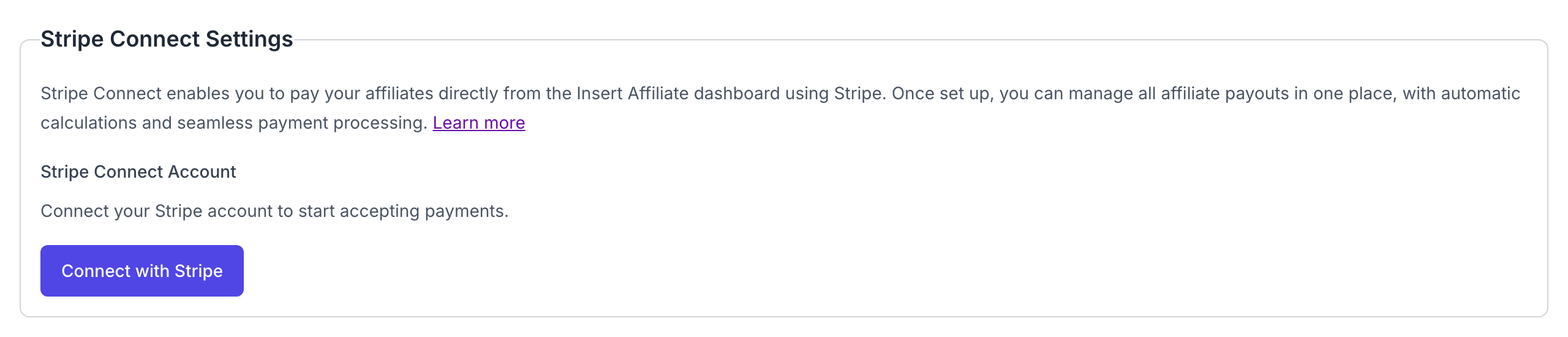
- Company Setup
- Connect your company's Stripe account in the company settings
- Complete the Stripe verification process
- Once verified, you'll be able to process payments to affiliates
Click to view full size
- Affiliate Setup
- Affiliates need to connect their Stripe account in their affiliate settings
- They'll need to complete Stripe's verification process
- Once verified, they can receive payments directly
Payment Views
All Transactions View
Real-time Overview
The All Transactions view provides a comprehensive overview of all transactions in real-time. You can:
- See all transactions across all affiliates
- Filter and search through transactions
- View payment statuses and methods
- Process payments directly from this view
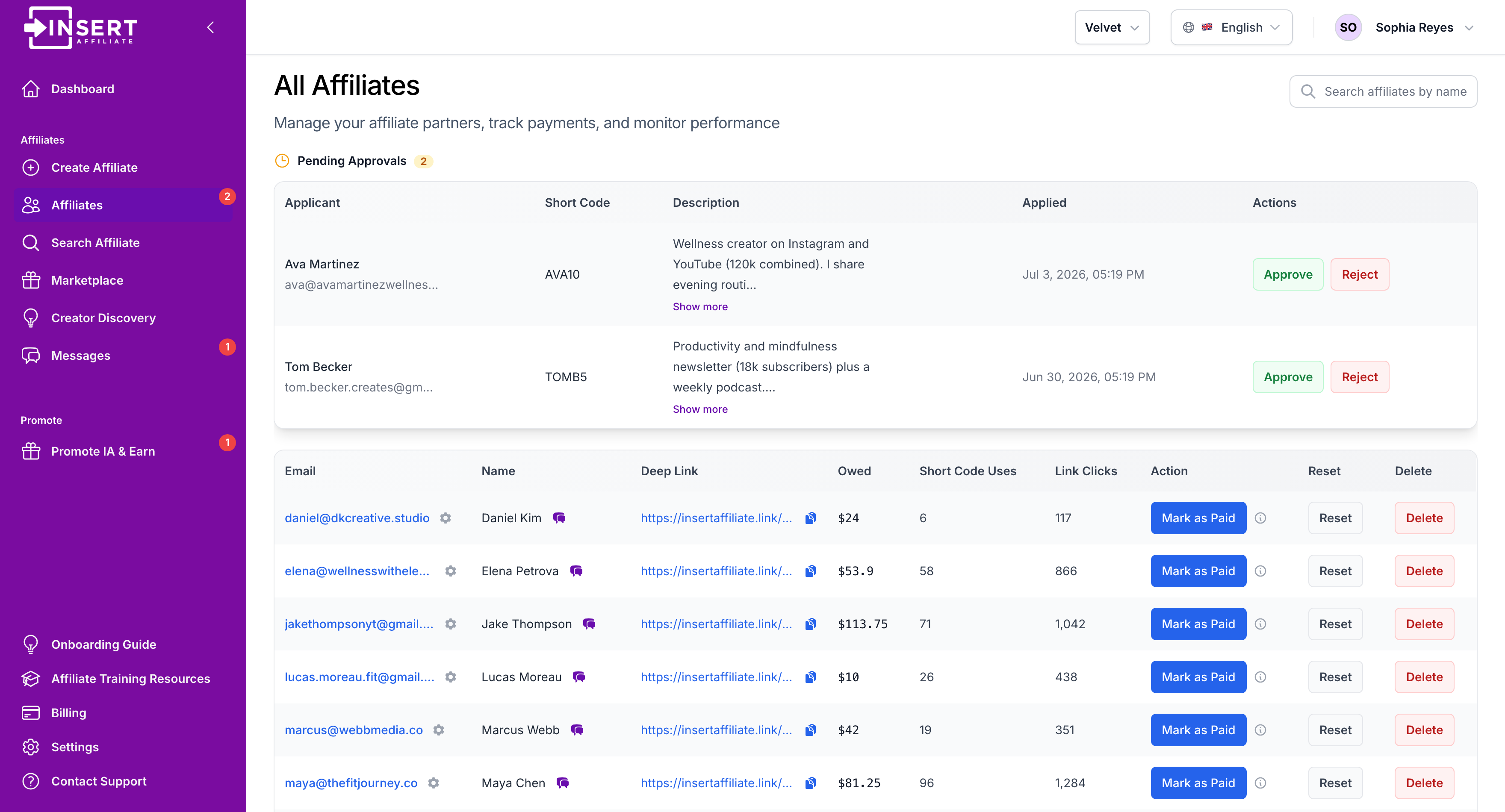
If an affiliate is due for payment, you'll see:
- "Pay via Stripe" button if both company and affiliate have connected Stripe accounts
- "Mark as Paid" button for external payment tracking
Fine Grained Transactions View
Updated in Real Time
For a more detailed view of individual transactions, you can:
- Search for an affiliate
- Navigate to the Affiliates section and click on an affiliate in the table
Here, you'll see:
- Individual transactions as they occur
- Payment status for each transaction
- Payment method used (Stripe or external)
- Payment reference IDs for Stripe payments
Payment Processing
Stripe Payments
When using Stripe Connect:
- Click "Pay via Stripe" on the transaction
- Enter payment details in the secure Stripe form
- Once processed, the payment is automatically marked as paid
- Affiliates receive the payment directly to their connected Stripe account
External Payments
For external payments:
- Click "Mark as Paid" on the transaction
- Process the payment outside the platform
- The transaction will be marked as paid in the system
Click to view full size
Payment Status
Each transaction shows its payment status:
- Unpaid: Payment pending
- Paid via Stripe: Payment processed through Stripe Connect
- Paid Externally: Payment marked as paid outside the platform
Requirements
To use Stripe Connect payments:
- Company must have a verified Stripe account
- Affiliate must have a verified Stripe account
- Both accounts must be connected to the platform
If either party hasn't completed the Stripe setup, external payment tracking will be available as a fallback option.
One-off Payments
A one-off payment is an amount you pay an affiliate that is not tied to a sale. Use it for a sign-on payment, a payment per post, a performance bonus, or anything else you have agreed with them.
To make one, go to the Affiliates section, click the affiliate, and open the One-off payments tab. The same button also appears in the affiliate's details.
Paying through Stripe
If the affiliate has connected their Stripe account:
- Click Pay a One-off Amount
- Enter the amount in USD (minimum $0.50) and a reason. The reason is required, can be up to 500 characters, and is shown to the affiliate
- Click Continue to Payment, enter your payment details in the secure Stripe form, and click Pay Now
- Once Stripe confirms the payment, it is marked as paid automatically
Stripe deducts its processing fee from the amount, so the affiliate receives slightly less than you entered.
Recording a payment made outside the platform
If you pay the affiliate yourself, click the arrow next to the button and choose Pay Externally. If the affiliate has not connected Stripe, the button reads Record a One-off Payment instead.
- Enter the amount in USD (minimum $0.01) and a reason
- Leave Mark as already paid ticked if you have already sent the money. Untick it to record the payment as pending
- Click Record Payment
A pending payment stays in the list until you click Mark as Paid on its row.
What the affiliate sees
The affiliate is emailed the amount and the reason: when the payment goes through for Stripe, or when you record it for an external payment. One-off payments are also listed in their own dashboard under One-off payments, with the date, amount, reason and status.
How one-off payments differ from commission
- They are always in USD
- They are kept separate from the affiliate's commission balance, so they do not change what the affiliate is owed for sales
- Automatic payouts do not pay them. A pending one-off payment waits for you
- They are never taken back when a sale is refunded
Payout Currencies
Stripe Connect payments, whether you click the pay button or use automatic payouts, can be made in any of the 133 currencies Stripe can charge in. That covers every major currency, including USD, EUR, GBP, CAD, AUD, JPY, INR, BRL, MXN, THB, IDR, TRY and NGN.
All 133 payout currencies
AED, AFN, ALL, AMD, ANG, AOA, ARS, AUD, AWG, AZN, BAM, BBD, BDT, BGN, BIF, BMD, BND, BOB, BRL, BSD, BWP, BYN, BZD, CAD, CDF, CHF, CLP, CNY, COP, CRC, CVE, CZK, DJF, DKK, DOP, DZD, EGP, ETB, EUR, FJD, FKP, GBP, GEL, GIP, GMD, GNF, GTQ, GYD, HKD, HNL, HTG, HUF, IDR, ILS, INR, ISK, JMD, JPY, KES, KGS, KHR, KMF, KRW, KYD, KZT, LAK, LBP, LKR, LRD, LSL, MAD, MDL, MGA, MKD, MMK, MNT, MOP, MUR, MVR, MWK, MXN, MYR, MZN, NAD, NGN, NIO, NOK, NPR, NZD, PAB, PEN, PGK, PHP, PKR, PLN, PYG, QAR, RON, RSD, RWF, SAR, SBD, SCR, SEK, SGD, SHP, SLE, SOS, SRD, STN, SZL, THB, TJS, TOP, TRY, TTD, TWD, TZS, UAH, UGX, USD, UYU, UZS, VND, VUV, WST, XAF, XCD, XOF, XPF, YER, ZAR, ZMW
Sales can come in from any currency. The payout currency is the currency the reward is owed in, which depends on how you reward:
- Percentage rewards on app store sales (Apple, Google Play, RevenueCat, Adapty, Iaptic) are worked out from the USD price, so they are owed and paid in USD whatever the buyer paid in
- Percentage rewards on Stripe web sales are owed in the buyer's currency
- Fixed amounts per currency are owed in the buyer's currency
Rewards in different currencies are paid as separate charges and are never converted at payout time.
Minimum payout per currency
Stripe won't take a charge below a minimum. Where Stripe publishes a minimum for a currency, we use it, for example 0.50 USD, 0.50 EUR, 0.30 GBP, 50 JPY, 10 THB or 175 HUF. Any other currency needs a payout worth at least US$1. A smaller amount stays owed and is paid once the affiliate's balance in that currency grows past the minimum.
American Express cards can't be charged in some currencies. If a payout is declined for that reason, pay with a Visa or Mastercard instead. You can also pay any reward yourself and use Mark as Paid, which works in any currency.
Need a currency that isn't listed? Get in touch and we'll look at adding it.
Refunds
When a sale is refunded, the commission it earned is taken back off the affiliate's balance. The owed amounts you see, and the amount the pay button charges, are always net of refunds.
- If the refund arrives before you pay, the sale and the refund cancel out and nothing is owed for it. Your payout hold, if you set one, applies to sales only; refunds are applied the moment they arrive
- If the refund arrives after you paid, the affiliate's balance goes negative. The shortfall is deducted from their next rewards before anything more is paid. Optionally, you can have balances that stay negative beyond a window you set recovered as a refund of an earlier payout to the affiliate's Stripe account
Refunds are picked up automatically from Apple, Google Play, RevenueCat, Adapty and Stripe, and you can report your own through the transactions API. Apphud and Iaptic refunds are not supported: a refund on those integrations does not reduce the affiliate's balance, cannot be confirmed, and is never recovered. Report those through the transactions API if you want the commission taken back. See Refunds and Clawbacks for the full rules, including how automatic payouts handle them.
VAT Invoices (Self-Billing)
For businesses that need VAT invoices for affiliate commission payments, we offer self-billing invoices. This feature allows you to automatically generate VAT invoices on behalf of your affiliates when you pay them via Stripe Connect.
Key Features:
- Automatic invoice generation on each payout
- Sequential invoice numbering (SB-YYYY-XXXX)
- Configurable VAT rates (default + per-affiliate)
- Monthly invoice summaries for easy record-keeping
- Affiliates consent to self-billing arrangement
Learn more about Self-Billing VAT Invoices →
How Often You Must Pay
Affiliate commissions are owed by you, not by Insert Affiliate. We calculate, track and, where you enable it, process those payments, but the money is yours and the obligation is yours.
Under our terms you must pay each affiliate every commission that has accrued to them and is not in dispute at least once in every four month period, and sooner if the terms you have offered that affiliate say so. Four months sits comfortably beyond the refund windows on the app stores, so a commission that has cleared your payout hold is very unlikely to be reversed afterwards.
A commission that has not met your minimum payout, or that is still inside your payout hold, is not yet payable and does not count against this. Once it clears both, the clock applies.
If commissions stay unpaid past that point they are treated as overdue, and we may suspend your account, tell the affected affiliates their payments are overdue, or charge the card on file to settle them. The full wording is in our terms and conditions.